Ask AI about your payroll. Keep the names on your computer.
A file with 120 employees and one question for ChatGPT: who costs what, team by team. Privacy Gateway turns names, tax codes and IBANs into codes on your machine and checks the result before anything leaves. When the answer comes back, the codes turn into names again.
- Runs 100% locally
- CSV · Excel · Word · PDF
- Blocks the file if a check fails
- Built for Italian data
How it works
From the payroll file to the answer, in three steps.
The model is good at the reasoning and has no use for the names. Codes stay the same from file to file, so totals and joins still add up.
Protect
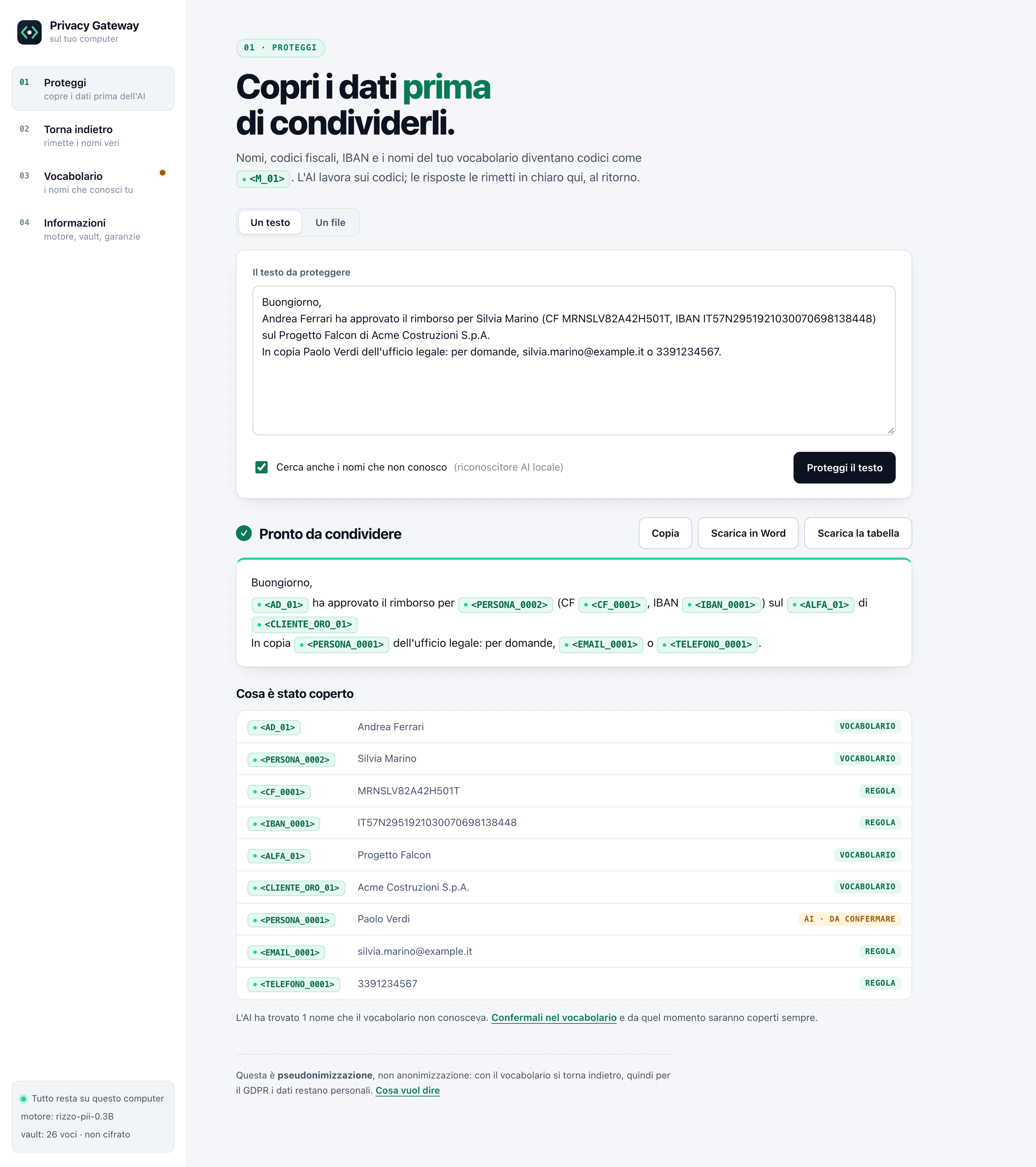
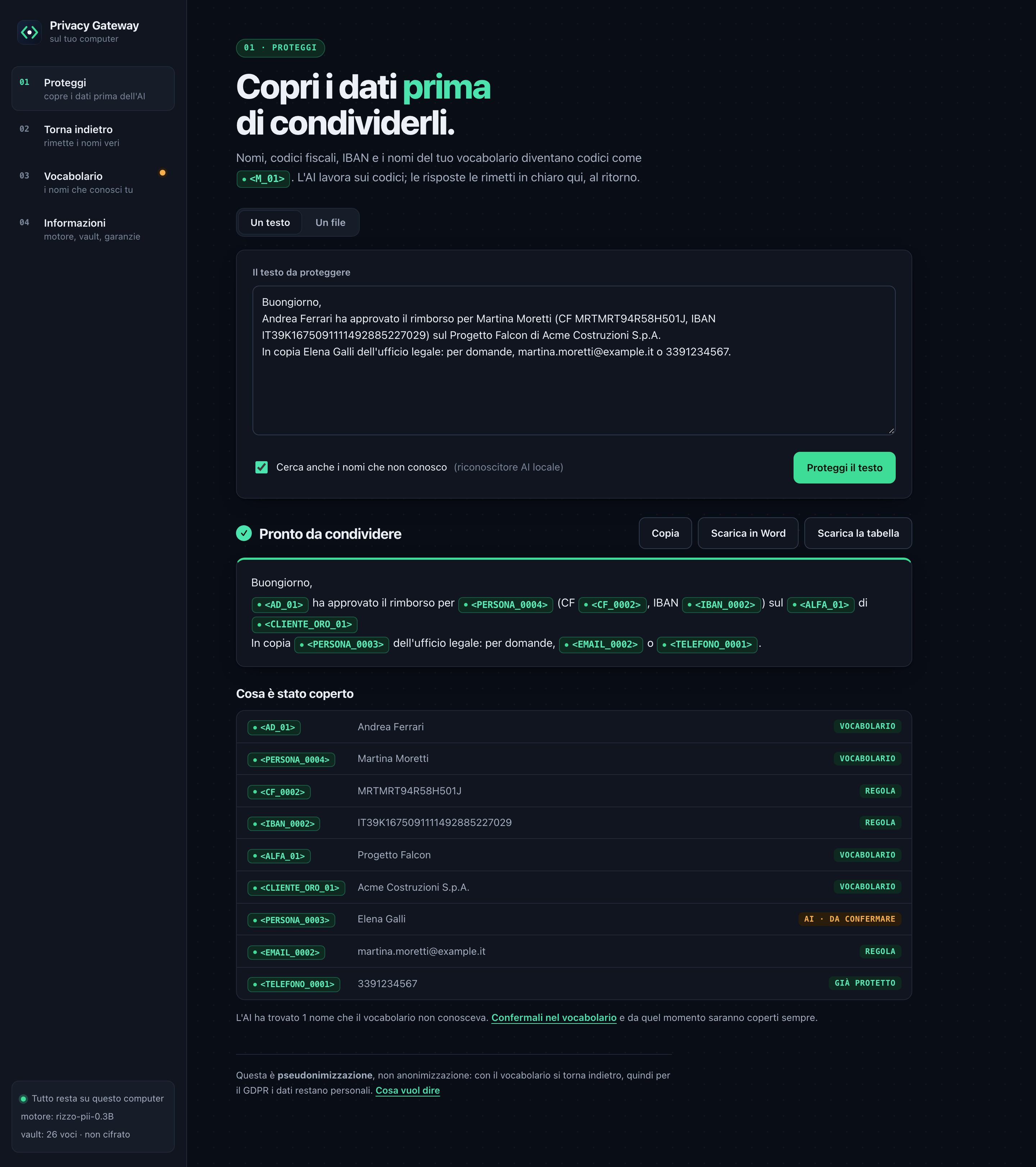
Paste a text or drop a file. Your company vocabulary is checked first, then tax codes and IBANs by their check digits, then a local AI recogniser for names nobody declared.
Ask any AI
Send the protected version to ChatGPT, Claude, Gemini or a local model. A separate check rereads the file first, and if a value is still in clear the file is not produced.
Restore
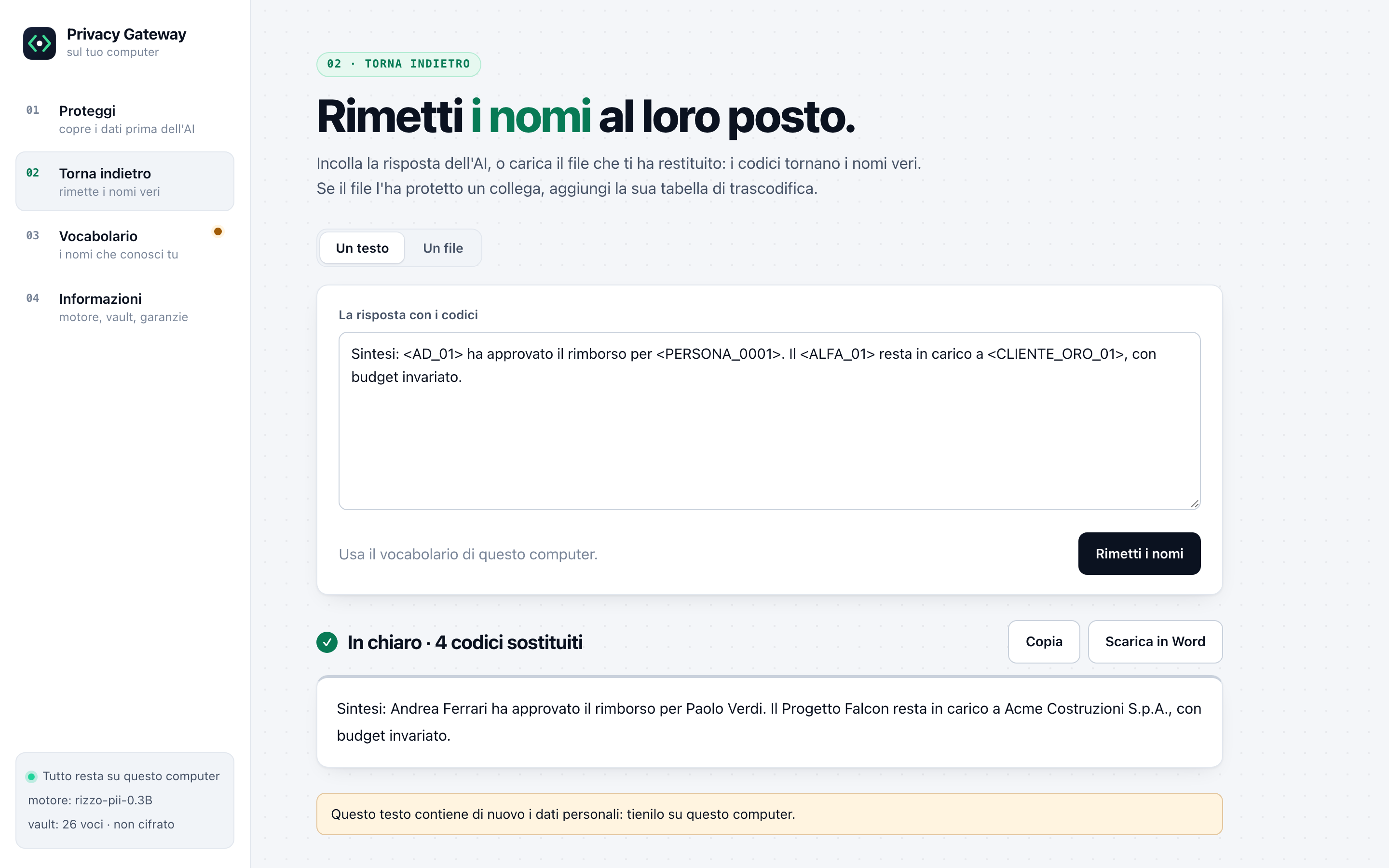
Paste the answer, or drop the file the AI gave back. The codes turn into names on your computer, where the vocabulary lives.
Features
What your company declared comes first.
Three sources, in order of trust. The vocabulary your company filled in. The check digits of tax codes, VAT numbers and IBANs. Last, a statistical model, which proposes new names and waits for a person to approve them.
Your vocabulary
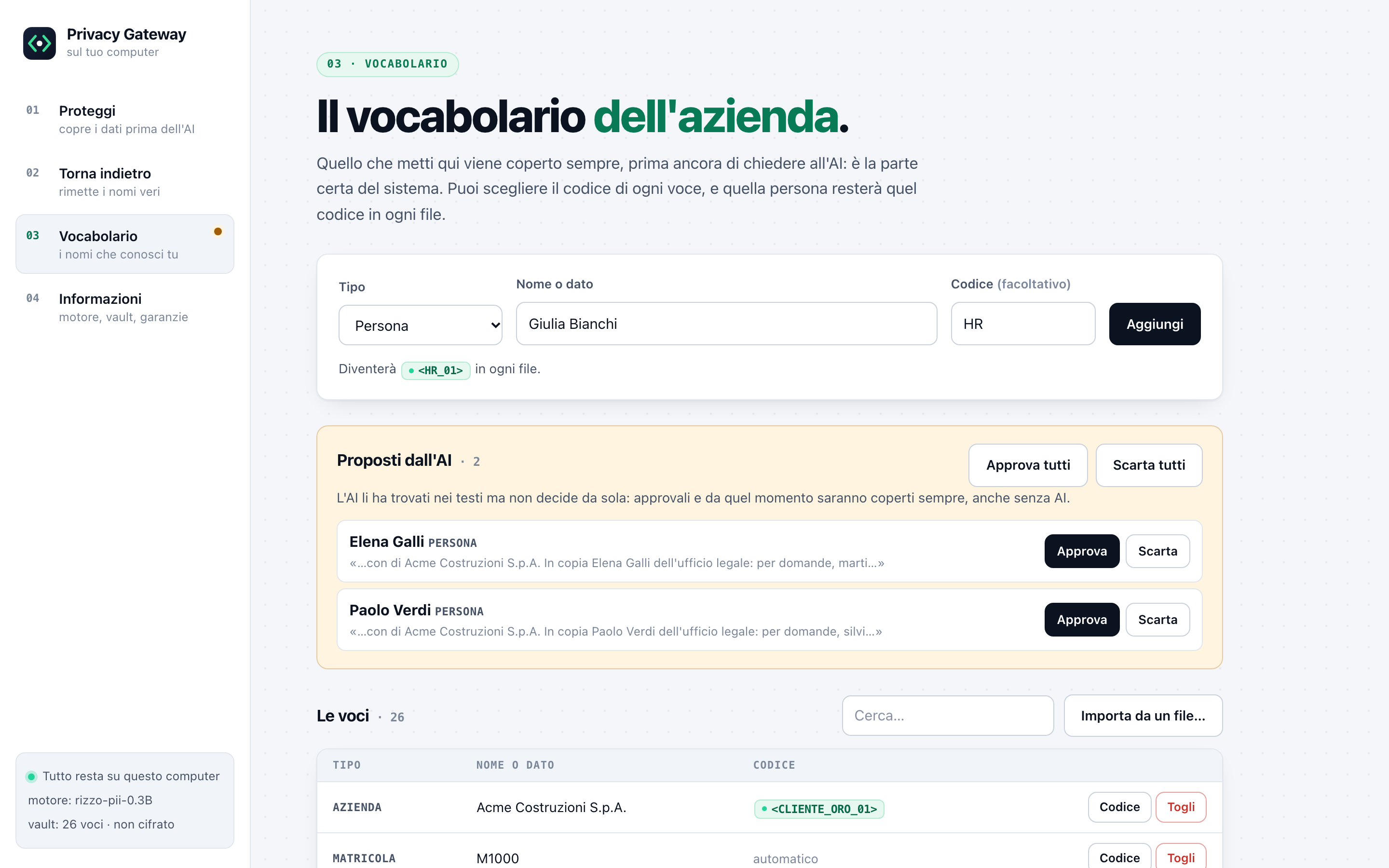
Employees, clients, projects. Import them from the spreadsheet you already have, and every name in it is covered each time, with no AI involved.
Codes you choose
Your CEO can be <AD_01> in every file you protect. A code that contains the name is refused, and a code already given stays as it is, so older files still restore.
A second pair of eyes
After protection, a check that shares no code with it rereads the output file: Word headers, tracked changes, PDF metadata included. If it finds a residue, the file is deleted.
CSV, Excel, Word, PDF
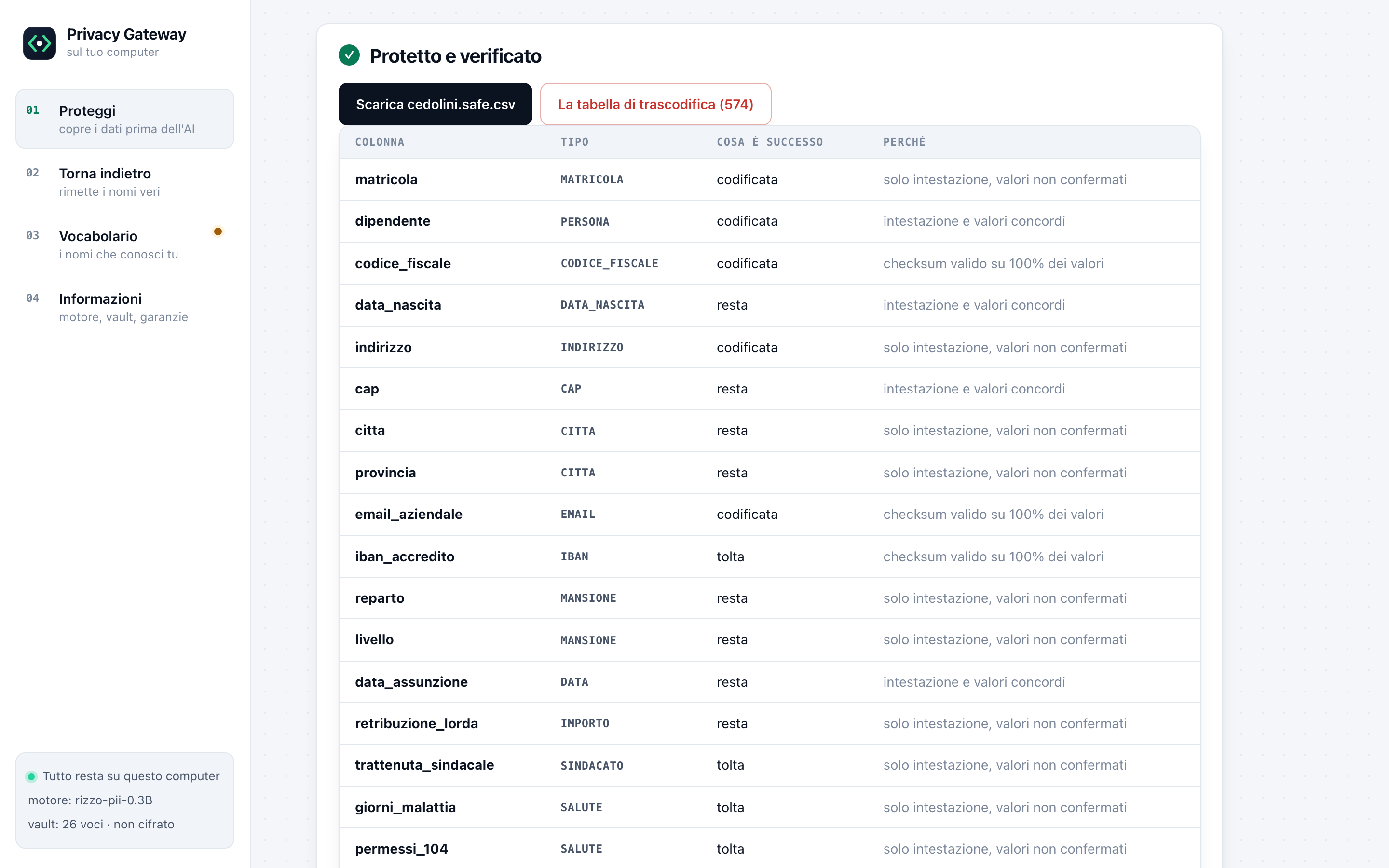
Spreadsheets are read column by column. A column of employee IDs stays a column of IDs, and amounts stay amounts. Word keeps its formatting. In a PDF the text under the black box is removed from the file.
The way back
Each protected file comes with its own transcoding table, downloaded separately. A colleague can restore the file without your computer. A PDF comes back as a Word file you can edit.
A recogniser on your CPU
For free text, rizzo-pii knows 22 categories of Italian personal data, licence plates and land registry references included. It runs offline.
Screenshots
For people who don't live in a terminal.
HR and finance offices use it from the browser. Light and dark theme follow your system.
Command line
The same engine, for scripts and AI agents.
Same vault, same rules. A hook for Claude Code and an MCP server stop an agent from opening company files that haven't been protected.
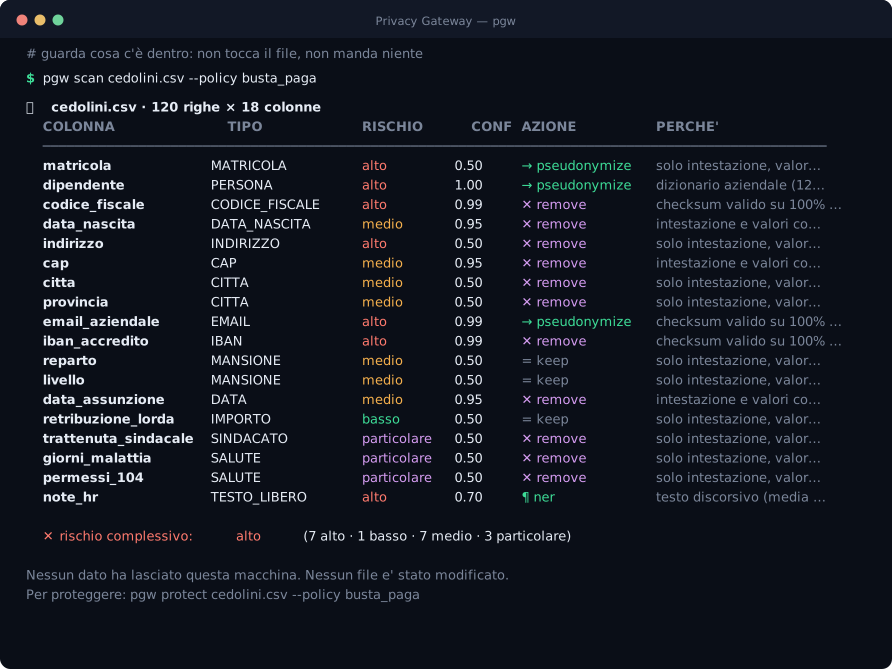
pgw appthe app, in your browserpgw protect payroll.xlsxa protected copy, checkedpgw restore answer.txtthe names, back on your computerLimits
Where it stops.
The codes can be reversed
Whoever holds the vocabulary can turn codes back into names. Under article 4 of the GDPR that is pseudonymisation, and pseudonymised data is still personal data. The risk goes down; the rules still apply.
Arithmetic is exact
Tax codes, VAT numbers and IBANs carry check digits. On those, the verification gives a certain answer.
Names depend on the vocabulary
A name nobody declared is found by the AI recogniser, with a probability attached. The vocabulary is how that gap closes over time.
Meaning isn't read
A sentence about three days of sick leave stays readable once the person is coded. If the topic itself is sensitive, the column or the sentence has to go.
Licence
Free to use. Companies ask for a written licence.
The source code is public, to read and to improve. Using it inside a business needs a written licence, and it costs nothing: it puts the terms in writing, and tells the author who relies on the project.
Personal and non-commercial
PolyForm Noncommercial 1.0.0
- Personal projects, study, research
- Schools and non-profit organisations
- All features, full source
Companies
For companies and professional firms
- Written licence terms, at no cost
- Use on company computers and servers
- Same software, same features
In italiano
Il file paghe resta in azienda. La domanda può uscire.
Centoventi dipendenti in un file Excel e una domanda da fare a ChatGPT: chi costa di più, reparto per reparto. Privacy Gateway sostituisce sul tuo computer nomi, codici fiscali, IBAN, partite IVA e le voci del tuo vocabolario aziendale con dei codici. Poi rilegge il file prodotto con un controllo separato, e se trova un dato rimasto in chiaro il file non esce.
Quando arriva la risposta, la incolli e i codici tornano nomi. Tradotto, all'AI arrivano i numeri e la struttura, le persone restano da te.
Funziona con CSV, Excel, Word e PDF, da un'app nel browser oppure dalla riga di comando. Il vocabolario aziendale viene prima dell'AI, i codici li puoi scegliere tu, e ogni file protetto ha la sua tabella di trascodifica per tornare indietro anche su un altro computer.
Non usi il terminale? Le istruzioni per installarlo con il doppio clic, su Mac e su Windows, sono in questa pagina.
È pseudonimizzazione, articolo 4 del GDPR: un dato pseudonimizzato resta un dato personale. Gratis per uso personale e non commerciale. Un'azienda o uno studio lo usano con una licenza scritta, gratuita anche questa: mirco@mircocervi.it.
FAQ
Questions people ask.
Is any data sent to the cloud?
No. The app, the vault and the AI recogniser all run on your computer, and the app's page doesn't load fonts or scripts from the internet. Only the protected file leaves, and only if you send it.
Is this anonymisation?
It is pseudonymisation, as defined in article 4 of the GDPR. Whoever holds the vocabulary can turn the codes back into names, so the data is still personal data. It lowers the risk of sharing data with an AI service; data-protection rules still apply.
Which AI can I use with the protected files?
Any of them: ChatGPT, Claude, Gemini, Copilot or a model on your own machine. They receive codes, and you paste their answer back to read it with the names.
Which formats are supported?
CSV, TSV, Excel, Word, PDF, plain text and Markdown in the app. Databases from the command line.
Does it work offline?
Yes. Once installed together with the AI recogniser, it doesn't need a connection.
Can my company use it?
Yes, with a written licence that is free of charge. Write to mirco@mircocervi.it with the name of the organisation and how you plan to use it.
The free-text recogniser is rizzo-pii-0.3B by Simone Rizzo (Rizzo AI Academy), released under the MIT licence. Thank you, Simone.